Email Deliverability Checklist: What to Check Before You Send (and What to Do When Emails Hit Spam)
When a client's email lands in spam, nobody asks whether it was a sender-reputation issue or a content issue. They ask what you did wrong.
Deliverability can feel like a black box, but a good part of it isn't. Some of it you control before every send, and some of it you set up once and monitor. This guide separates the two, gives you a checklist for each, and covers what to do when things go wrong.
What "deliverability" actually covers
Deliverability is whether your email reaches the inbox, rather than the spam folder or being rejected outright. It depends on three things:
- Authentication. Can the receiving server confirm the email really came from you?
- Reputation. How have recipients and mailbox providers treated your sending domain in the past?
- Content and list quality. Does this specific email, sent to this specific list, look like something people want?
Authentication is set up once. Reputation builds over time. Content and list quality are decided campaign by campaign, which is where most day-to-day mistakes happen, and where a pre-send check pays off.
Part 1: Checks you run before every send
These are the content-level checks. They are quick, and most can be automated.
Subject line and preheader
- No ALL CAPS, stacked punctuation (!!!) or misleading "Re:" or "Fwd:" prefixes.
- The subject matches what's in the email. A subject that promises something the email doesn't deliver gets complaints.
- Personalisation in the subject has a fallback, so it never renders as a blank or a raw merge tag.
Links
- Every link works and goes to the right page.
- No link shorteners from public services, which are widely abused and can look suspicious.
- Link text matches the destination. Text that shows one URL and goes to another looks like phishing.
- UTM parameters are present and consistent, so you can tell whether the campaign worked.
Images and layout
- Not one large image with little or no text. Emails that are mostly image are harder for filters to assess and break completely when images are blocked.
- Every image has alt text, which also helps accessibility.
- A sensible balance of text to images, and a plain-text version that reads properly.
Copy
- No spam-trigger phrasing piled up (excessive "free", "act now", "guaranteed", heavy urgency). One or two words don't sink an email, but a pattern of them can.
- The tone matches what the subscriber signed up for.
Personalisation
- No unresolved merge tags, such as {{first_name}} showing up in the body or subject.
- Every dynamic field has a fallback for contacts with missing data.
Compliance essentials
- A working unsubscribe link that is easy to find.
- A physical or postal address in the footer where your jurisdiction requires it.
- A clear sender name and a From address that recipients recognise.
For the full list of content checks, see our Email QA Checklist for Agencies and Freelancers.
Part 2: Set up once, then monitor
These don't change campaign to campaign, but they matter more than any content tweak.
Authenticate your sending domain
- SPF lists the servers allowed to send for your domain.
- DKIM adds a signature that proves the message wasn't altered.
- DMARC tells receivers what to do when SPF or DKIM fail, and gives you reporting.
Authentication should align with the domain shown in your From address. Most ESPs walk you through the DNS records. After adding them, confirm they work with a DNS checker such as MXToolbox and by sending a test and checking the message headers.
Meet the major mailbox providers' requirements
Google and Yahoo both tightened their sender requirements. According to Google's guidance, bulk senders (about 5,000 or more messages a day to Gmail accounts) need SPF, DKIM and a DMARC record, plus a one-click unsubscribe in marketing mail, with opt-outs honoured within two days. Their advice is to keep your spam complaint rate below 0.1% and never let it reach 0.3%.
You may not be a bulk sender yet, but following the same rules at any volume is sensible, and your clients' lists may be larger than yours. Check Google's sender guidelines for the current detail, since requirements change.
Monitor your reputation
- Google Postmaster Tools shows your spam rate and domain reputation for Gmail recipients. Set it up for every client sending domain.
- Spamhaus maintains widely used blocklists. If a domain or IP is listed, many receiving servers will reject or filter its mail.
- Watch bounce rate and complaint rate in your ESP's reports, not only opens and clicks.
Keep the list clean
- Send to people who asked to hear from you.
- Remove hard bounces straight away.
- Suppress long-term non-engagers rather than mailing them forever. Sending to people who never open can hurt your reputation.
- Avoid bought or scraped lists. They carry spam traps and high complaint rates.
Part 3: When emails start landing in spam
Work through it in order. Don't change five things at once, or you won't know what fixed it.
- Confirm the problem. Is it all recipients or one provider, such as Gmail? One campaign or every campaign? Seed accounts at the major providers will show you where it lands.
- Check authentication first. If SPF, DKIM or DMARC have broken (a changed DNS record or a new sending tool), that's often the cause and the easiest fix.
- Check blocklists. Look up your sending domain and IP on Spamhaus and similar lists.
- Check your complaint and bounce rates. A spike points to a list or targeting problem rather than a technical one.
- Check Postmaster Tools for domain reputation and spam rate changes at Gmail.
- Review the campaign itself. Compare it with campaigns that did reach the inbox: subject line, link domains, image weight, copy.
- Fix the cause, then send less and send better. Reduce volume to your most engaged subscribers while reputation recovers, rather than blasting the full list.
If a blocklist or reputation problem is serious, your ESP's deliverability support can help, and some problems take weeks to recover from.
The deliverability checklist
Before every send
- Subject line is honest and has no unresolved merge tags
- All links work, with no public link shorteners
- Alt text on images, and a healthy text-to-image balance
- No pile-up of spam-trigger phrases
- Merge tags resolve, with fallbacks for missing data
- Unsubscribe link and footer address present
- Sender name and From address recognisable
Set up once
- SPF, DKIM and DMARC configured and aligned with the From domain
- One-click unsubscribe enabled for marketing mail
- Google Postmaster Tools set up for the sending domain
- A way to check blocklists, such as Spamhaus
Ongoing
- Complaint rate kept below 0.1%
- Hard bounces removed, non-engagers suppressed
- List built from people who opted in
- Review reports after every campaign
Where SendCleared fits
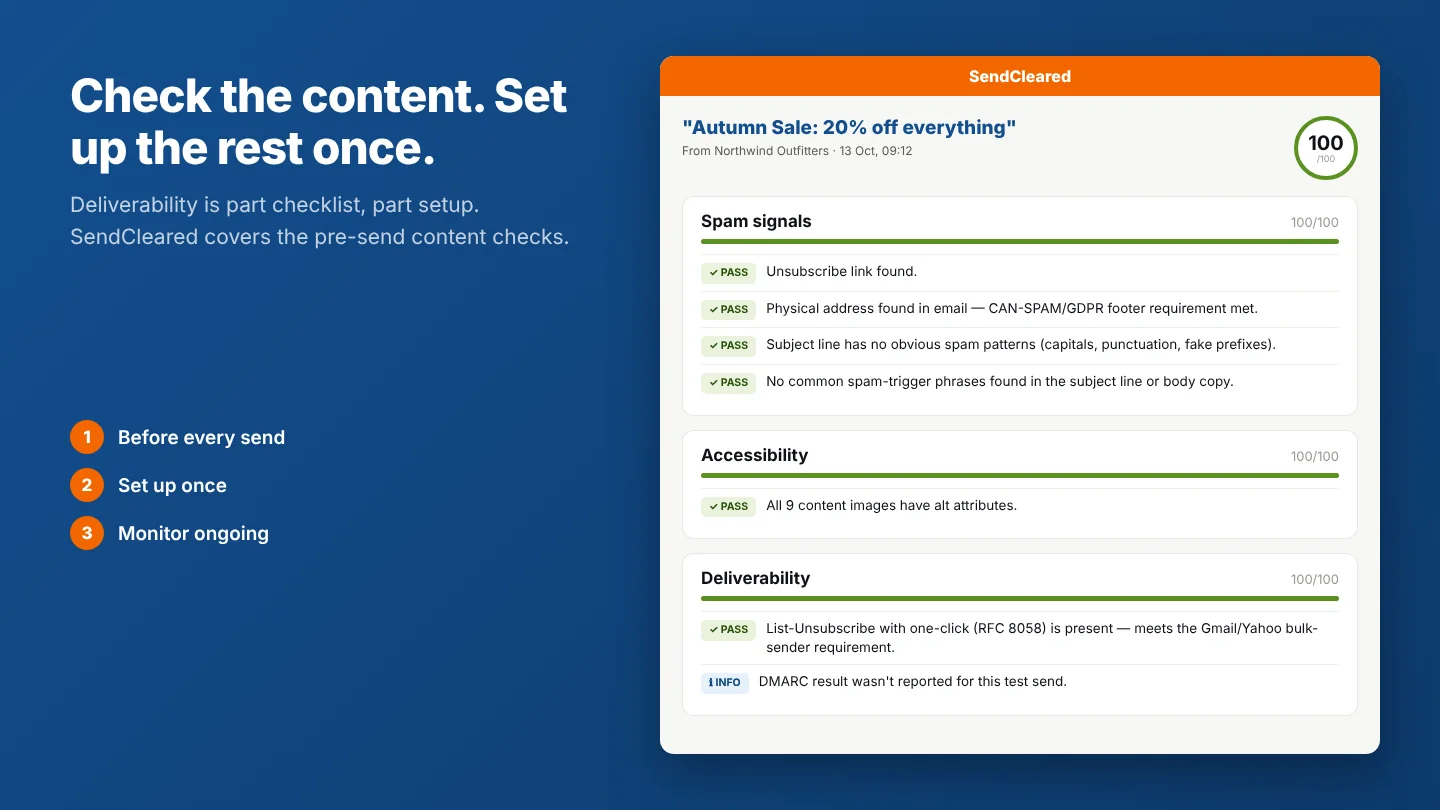
SendCleared automates many of the checks in the first checklist: the content-level checks before a campaign goes to your client. You send your normal test from your ESP, and it flags unresolved merge tags, broken links, missing alt text, spam triggers and unsubscribe and address essentials. It also reads the authentication results (SPF, DKIM and DMARC) and the List-Unsubscribe header recorded on that test email, then gives your client a single link to approve.
To be clear about what it doesn't do: it doesn't check your DNS records directly, monitor your sender reputation or measure inbox placement. For those, use the tools above alongside it. Think of it as the step that stops avoidable content mistakes reaching your client or your subscribers.
Common questions
Why are my emails going to spam?
Usually one of four things: missing or broken authentication, a poor sender reputation caused by complaints or bounces, a list with low engagement, or content that triggers filters. Check them in that order.
Do spam trigger words still matter?
Less than they used to. Filters look at the overall picture, including authentication, reputation and engagement. But pushy, spammy copy still raises risk, especially combined with other warning signs.
Do I need DMARC if I'm not a big sender?
It's increasingly expected, and bulk senders at Gmail are required to have it. Setting it up is worth doing at any volume, because it protects your domain from being spoofed and gives you reporting.
How low should my spam complaint rate be?
Google's guidance is to keep it below 0.1% and never reach 0.3%. The lower the better.
Can a pre-send tool guarantee inbox placement?
No tool can. Inbox placement depends on your reputation and recipient behaviour, which can't be tested from a draft. A pre-send check removes avoidable content mistakes. It can't tell you how mailbox providers will treat your domain.
SendCleared checks your email before your client sees it, then gives them a clean way to review and sign off.
Start free →3 approval links a month, no credit card required