How to Get Client Sign-Off on Email Campaigns (Without the Slack Chaos)
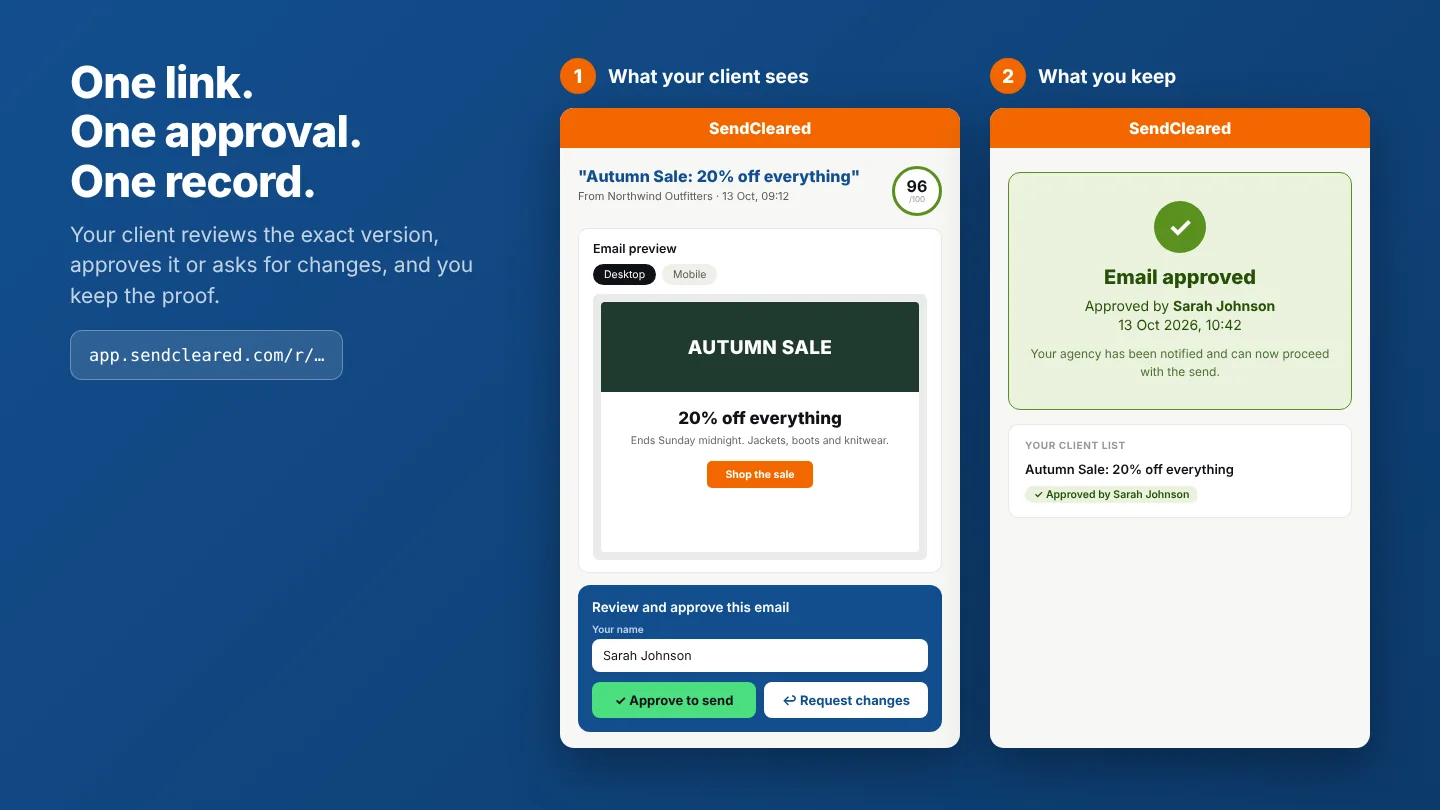
Most agencies and freelancers have a process for building a campaign. Far fewer have a process for getting it approved.
So approval happens wherever the client happens to reply. A "looks good" in Slack. A thumbs-up on a forwarded test. A reply to a thread that has since been forwarded to two other people. It works right up until it doesn't, and by then the email has already gone out.
This guide covers how to set up a client approval workflow for email campaigns that's quick for the client, clear for your team, and leaves a record you can point to later.
Why informal approval breaks down
The problems are consistent across agencies of every size.
- Nobody is sure what was approved. The client saw a test email on Tuesday. You made two changes on Wednesday. On Thursday they replied "great, go ahead." Which version did they mean?
- Feedback is scattered. Some comes by email, some in Slack, some on a call, some as a screenshot with arrows. Someone has to consolidate it, and something always gets missed.
- The wrong person approves. A marketing contact says it looks fine, then their manager or legal team sees it after sending and has changes. Approval without authority isn't approval.
- Silence gets treated as a yes. The deadline passes, nobody replies, and the team sends because the schedule says so. If something's wrong, that's a hard conversation.
- There's no record. When a client says "I never signed off on that," you're searching through channels for evidence instead of pointing to one clear entry.
None of these are the client's fault. They're what happens when approval is left to chance.
What a good client approval workflow needs
Whatever tools you use, a workable process has seven parts.
- A named approverOne person (or a defined group) whose approval counts. Agree who it is at onboarding.
- A frozen versionThe client approves a specific, final version, and everyone can tell which one.
- QA before the client sees itThe client reviews content and offers, not broken links or unresolved merge tags.
- A single place to review and respondOne link, one place for comments, rather than three channels.
- A defined review windowA stated deadline, and an agreed rule for what happens if it passes.
- Version-by-version re-approvalAny change after approval means a new version and a new sign-off.
- A recordWho approved, which version, and when.
The process, step by step
- Agree how approvals work at onboarding. Do this before the first campaign. Cover who approves, how long they have to review, and what happens if they don't respond. Put it in writing, in your onboarding document or a short one-page "how approvals work" note. A template is below.
- Run your own QA first. Check links, merge tags, alt text, personalisation fallbacks, the unsubscribe link and the footer before anything reaches the client. Our Email QA Checklist covers what to check. A client who finds a typo you should have caught starts doubting everything else.
- Freeze the version. Once it passes QA, stop editing. If anything changes after the client has seen it, it's a new version. Say so explicitly.
- Send one review link. Don't forward a test email, paste screenshots or attach a PDF. Send a single link to the exact version, viewable at desktop and mobile width, so the client reviews the same thing you built. We cover why standard test sends fall short in How to Send a Test Email Your Client Can Actually Review.
- Say what you need from them. Tell the client what to check (copy accuracy, offer details, links, subject line) and what's already settled (layout, if signed off earlier), and when you need an answer. A short brief gets sharper feedback than an open "let me know what you think."
- Collect feedback in one place and re-version. Make the requested changes, then send a new link for the new version. Never ask the client to approve "the one from Tuesday with the changes we discussed."
- Get an explicit approval. "Looks good" in a busy thread is ambiguous. You want a deliberate action that clearly means yes, with a name and a timestamp attached.
- Keep the record and hand off to the send. File the approval with the campaign. When scheduling, check that the approved version is the one you're scheduling.
Handling the awkward cases
- Multiple approvers. If legal, brand or a manager must also sign off, agree the order in advance and list them as part of the process. A late-stage reviewer adding changes after the client contact has approved is one of the most common causes of last-minute chaos.
- Silence. Decide what a missed deadline means before it happens. Common options are a reminder, then escalation to a second contact, then a rescheduled send. Avoid treating silence as approval unless it's explicitly agreed in your contract, and be careful with that one.
- Urgent sends. A time-sensitive email still needs approval. Agree a faster route (a shorter window, a named backup approver) so urgency doesn't become the excuse to skip the process.
- Changes after approval. If the client wants a change after signing off, treat it as a new version with a fresh approval. The earlier approval stays on record for the version it covered.
Put it in your contract
Your service agreement is a good place to state how approval works: who the authorised approver is, that approval of a specific version is what authorises the send, and what the review window is. If a dispute comes up, a clear process and a clear record are much stronger than a conversation you're trying to reconstruct. Have a lawyer check the wording, since this isn't legal advice.
A "how approvals work" note you can adapt
How campaign approvals work
1. We'll send you one review link for each campaign. It shows the exact email that will go out, on desktop and mobile.
2. Please review the copy, offer details, links and subject line. Layout is already agreed unless we say otherwise.
3. Approve it, or request changes on the page. If you request changes, we'll send a new link for the updated version.
4. We only send once [Name / role] has approved the latest version.
5. Please reply within [X working days]. If we haven't heard by then, we'll [follow up / escalate to Name / move the send date], and we won't send an unapproved email.
6. We keep a record of each approval, showing who approved which version and when.
Choosing a tool for this
You can run this process with shared documents and discipline, but it takes manual effort to keep versions and records straight. Tools fall into a few groups: general proofing platforms built for many asset types, email testing tools built around rendering and deliverability, and email-specific approval tools. We compare them in The Best Client Approval Tool for Email Marketers.
Doing this with SendCleared
SendCleared is built around this workflow and works with any ESP that can send a test email.
- Add your client and get a unique test address, added to your ESP's test list once.
- Send your test as normal from Klaviyo, Mailchimp, ActiveCampaign or wherever you build.
- Review the automated QA report. Checks run across merge tags, links, alt text, spam triggers and unsubscribe and address essentials. Fix anything flagged.
- Share the approval link. Your client sees the email at desktop and mobile widths and approves it or requests changes.
- Keep the record. The approval is logged with a name and timestamp.
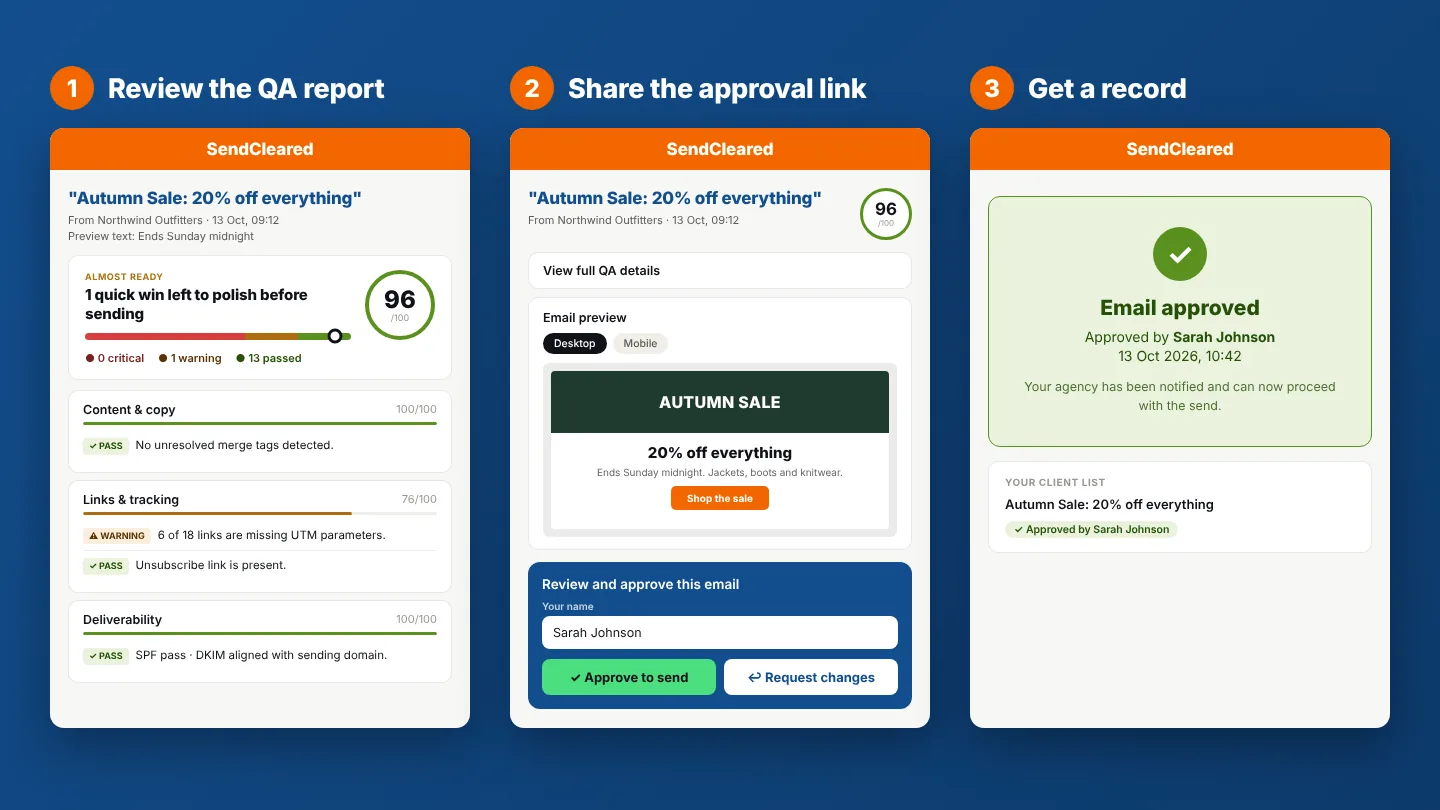
One honest note: the approval page shows desktop and mobile widths, not a multi-inbox rendering test. If you need to check how an email displays across every inbox, a rendering tool is a good companion.
Common questions
Who should approve an email campaign?
The person with authority over the campaign's message and offers, agreed with the client in advance. If more than one person must sign off, agree the order and who has the final say.
How long should a client have to review?
Long enough to read and respond properly, short enough to protect your send date. Agree a number at onboarding, and build it into your schedule.
Is a "looks good" reply enough?
It's better than nothing, but it's ambiguous about which version it covers and who gave it. A specific action tied to a version, a name and a timestamp is much stronger.
What if a client approves, then asks for a change?
Treat it as a new version. Make the change, generate a new link and get a fresh approval. The earlier approval remains on record for the version it covered.
Do I need software for this?
No, but without it you're keeping versions, feedback and records together manually. Software helps most when you manage several clients or campaigns at once.
SendCleared checks your email before your client sees it, then gives them a clean way to review and sign off.
Start free →3 approval links a month, no credit card required