How to Send a Test Email Your Client Can Actually Review
You've built the campaign. It's ready for the client to look at. So you hit "send test," type in their email address, and wait.
Three days later you get a reply: "Can we change the second paragraph? Also the button looks odd. Actually, Sarah wants to see it too."
Sending a standard ESP test email to a client is the default workflow for most freelancers and agencies, and it's quietly one of the weakest steps in the whole process. This guide covers why it goes wrong, what a reviewable test email actually needs, and a step-by-step way to get a clear yes from your client without the back-and-forth.
Why a standard test email is the wrong thing to send a client
A test email is designed for you, the person building the campaign. It isn't designed for someone who has to review and approve it. That mismatch causes most of the problems:
- It often doesn't show what subscribers will see. Test sends commonly use placeholder or sample data rather than a real contact's details, so merge tags and dynamic content may not render the way they will for real recipients. A client who sees a blank first name or a placeholder value will, reasonably, ask whether it's broken.
- It doesn't look like the real thing. Many ESPs label test sends, and a test can land in spam or a promotions tab, which is the opposite of what you want a nervous client to see.
- Feedback arrives in the worst possible format. It comes as a reply thread, a forwarded copy with comments, or a message in Slack. Nobody can tell which version the feedback refers to, and the same point gets made three different ways.
- There's no record. When a client replies "looks good," it's not clear what they approved, whether they saw the final version, or who else signed off. Three weeks later, when someone says "I never approved that," you're scrolling through a thread.
- Giving clients ESP access isn't a real alternative. It's a security and permissions headache, and most clients don't want a login to a tool they'll never otherwise use.
What a reviewable test email actually needs
Whatever tool you use, a version your client can properly review has five things:
- The exact final version. Frozen, so the feedback and the approval both refer to the same thing.
- Realistic data. You've checked that merge tags and dynamic blocks resolve correctly before the client sees it.
- A clear ask. What they're reviewing, what they're not, and by when.
- One place for feedback. Not a thread, not three channels.
- A record. A name, a timestamp, and which version was approved.
How to send a test email your client can review: step by step
- Run your own QA first. Never let a client be the first person to find a broken link or an unresolved merge tag. Work through a proper checklist before anything goes to them — our Email QA Checklist covers merge tags, links, alt text, spam triggers and the footer essentials.
- Send a test to yourself with realistic data. Check it on desktop and on your phone. Look specifically at personalization: first name, dates, product blocks, and anything that changes by segment. If you use fallback values, confirm they read naturally ("Hi there," rather than "Hi ,").
- Freeze the version. Once it passes your own checks, stop editing. If you change anything after the client has seen it, treat it as a new version and make that explicit.
- Give the client a single review link. Don't forward the test email, don't paste a screenshot, and don't attach a PDF. A single link to the exact version, viewed the way a subscriber would see it on desktop and mobile, removes the "which version?" problem and keeps the review in one place.
- Tell them exactly what to check. A short brief gets you better feedback than an open invitation to comment. Say what you need from them (copy accuracy, offer details, links, brand voice) and what's already settled (layout and design, if they signed those off earlier). It also helps to give a deadline.
- Collect feedback in one place and re-version. If they ask for changes, make them, then send a new link for the new version. Never ask a client to approve "the one from Tuesday, with the changes we discussed."
- Get an explicit, recorded approval. "Looks good" in a busy thread isn't an approval. You want a specific action that clearly means yes, with a name and a timestamp attached.
A review request you can copy
Hi [Name],
The [campaign name] email is ready for your review: [link]
Please check: the copy and offer details, the links, and the subject line and preview text. The layout was approved earlier, so no need to revisit that unless something looks wrong.
It's scheduled to send [date/time], so I'll need your sign-off by [deadline]. If you'd like changes, just flag them on the page and I'll send an updated version.
Thanks!
Doing this with SendCleared
SendCleared is built around exactly this workflow, and it works with any ESP that can send a test email.
- Add your client and get a unique test address. One persistent address per client, added to your ESP's test list once.
- Send your test as normal. From Klaviyo, Mailchimp, ActiveCampaign or wherever you build, send the test to that address.
- Review the QA report. Automated checks run in about ten seconds across merge tags, links, alt text, spam triggers and the unsubscribe and address essentials. Fix anything flagged and re-send.
- Share the approval link. Your client gets a branded link where they can see the email at desktop and mobile widths and approve it or request changes.
- Get a record. The approval is logged with a name and timestamp, so it holds up later.
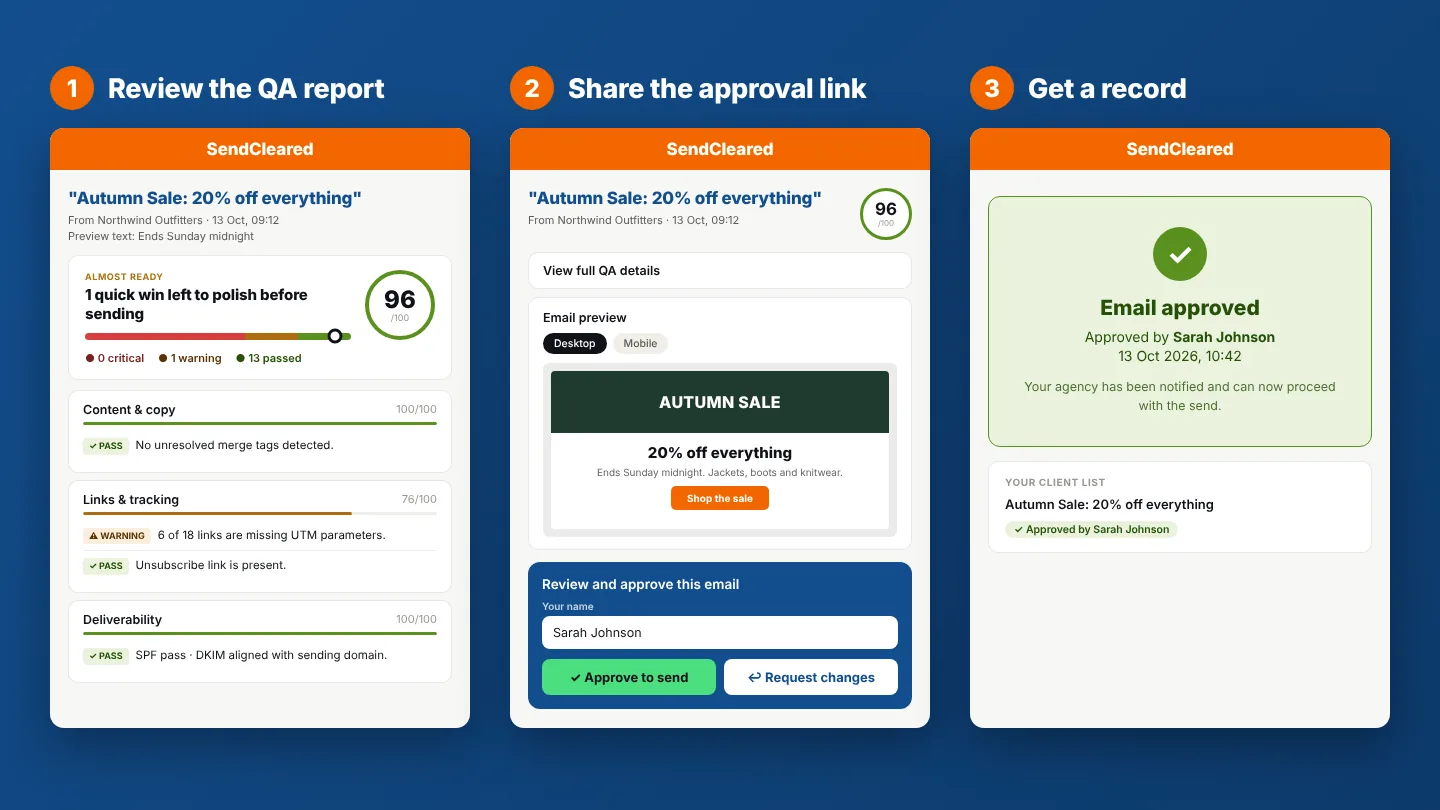
One honest note: the approval page shows the email at desktop and mobile widths. It isn't a multi-inbox rendering test (checking how it displays in Outlook, Gmail, and so on). If that's your main need, a rendering tool is the right complement. For the step between "I've finished building this" and "my client has approved it," SendCleared does the job.
Common questions
Can I just send my client the ESP's test email?
You can, and plenty of people do. The trade-offs are the ones above: placeholder data, vague feedback, and no record of what was approved.
Does my client need an account?
No. They open the link, review, and approve.
What if the client wants changes after approving?
Treat it as a new version. Make the change, generate a new link, and get a fresh approval. The earlier approval stays on record for the version it covered.
What about the ESP's built-in preview link or shareable preview?
Some ESPs offer one, and it can work for a quick look. It typically doesn't give you a structured approval or a record of who approved which version.
SendCleared checks your email before your client ever sees it, then gives them a clean way to review and sign off.
Start free →3 approval links a month, no credit card required