The Best Client Approval Tool for Email Marketers (2026)
Updated October 2026 · Pricing checked October 2026
Getting a client to approve an email before it sends sounds simple. In practice it usually means a forwarded test, a thread of conflicting comments, and a “looks good!” that nobody can prove later.
There are three kinds of tool people use to fix this, and they solve different problems. This page compares them, including where SendCleared fits and where it doesn’t.
Disclosure: this page is published by SendCleared. We’ve tried to be fair about what each option does well, and we link to each vendor so you can check current details yourself.
The short answer
- You send email campaigns for clients and need a clean, provable sign-off: an email-specific approval tool like SendCleared.
- You need to test how emails render in dozens of inbox and device combinations: a rendering tool such as Litmus or Email on Acid (now moving to Mailgun Inspect).
- You review lots of different asset types (video, PDFs, ads, web pages) as well as email: a general proofing platform such as Ziflow, Filestage or ProofHub.
- You send only a few campaigns and your clients are relaxed: a shared preview link plus a clear email may be enough.
Most agencies end up combining two of these, which is fine. They check different things.
What “client approval” should actually give you
Before comparing tools, it helps to be clear about the job. A good approval step gives you:
- A frozen version. The client approves the exact email that will send.
- Content checks first. Broken links and unresolved merge tags are caught before the client sees anything.
- One place for feedback. Not a thread, not three channels.
- A record. Who approved, which version, and when.
- Low friction for the client. They shouldn’t need to learn a tool to say yes.
Judge every option below against those five.
Comparison at a glance
Swipe the table sideways to see every option →
| SendCleared | Litmus (Proof) | Email on Acid / Mailgun Inspect | Ziflow, Filestage, ProofHub | ESP preview link + thread | |
|---|---|---|---|---|---|
| Built for | Freelancers and agencies sending email for clients | In-house email teams | Email teams and developers | Creative and marketing teams reviewing many asset types | Anyone, as a quick fix |
| Client sign-off with record | Yes: name, timestamp, version | Proof supports comments and an approval button, with external reviewers by email or link. Listed as an Enterprise-plan feature | Not the core workflow | Yes, built for review and approval | No structured record |
| Automated email content QA | Yes: merge tags, links, alt text, spam triggers, unsubscribe and address checks | Yes, as part of a wider platform | Yes: link, image and accessibility checks, code analysis (higher plan) | Generally not email-specific | No |
| Inbox rendering previews | No (desktop and mobile widths only) | Yes, 100+ clients and devices | Yes, 100+ clients and devices | No | No |
| Works with any ESP | Yes, via a test send | Yes | Yes | Yes (upload or share a file or link) | Depends on ESP |
| Typical cost | Free tier; paid from $19/mo | No public price; contact Litmus | Basic $99/mo, Premium $199/mo (changing with the Mailgun Inspect move) | Ziflow and Filestage have limited free plans, paid from about $199/mo; ProofHub from about $45/mo (billed annually) | Free |
Pricing changes often and third-party listings disagree. Figures above were checked in October 2026 against each vendor’s own pages; check them again before deciding.
The options in detail
1. SendCleared: email-specific QA and client approval
Best for: freelancers and small-to-mid agencies who send campaigns for clients and need a clear, provable yes before anything goes out.
SendCleared is built around one workflow. You add a client and get a unique test address, send your normal test from your ESP, and an automated check runs in about ten seconds across merge tags, links, alt text, spam triggers, UTM parameters and the unsubscribe and address essentials. You then share a branded approval link. The client sees the email at desktop and mobile widths and approves it or requests changes. The approval is logged with a name and a timestamp.
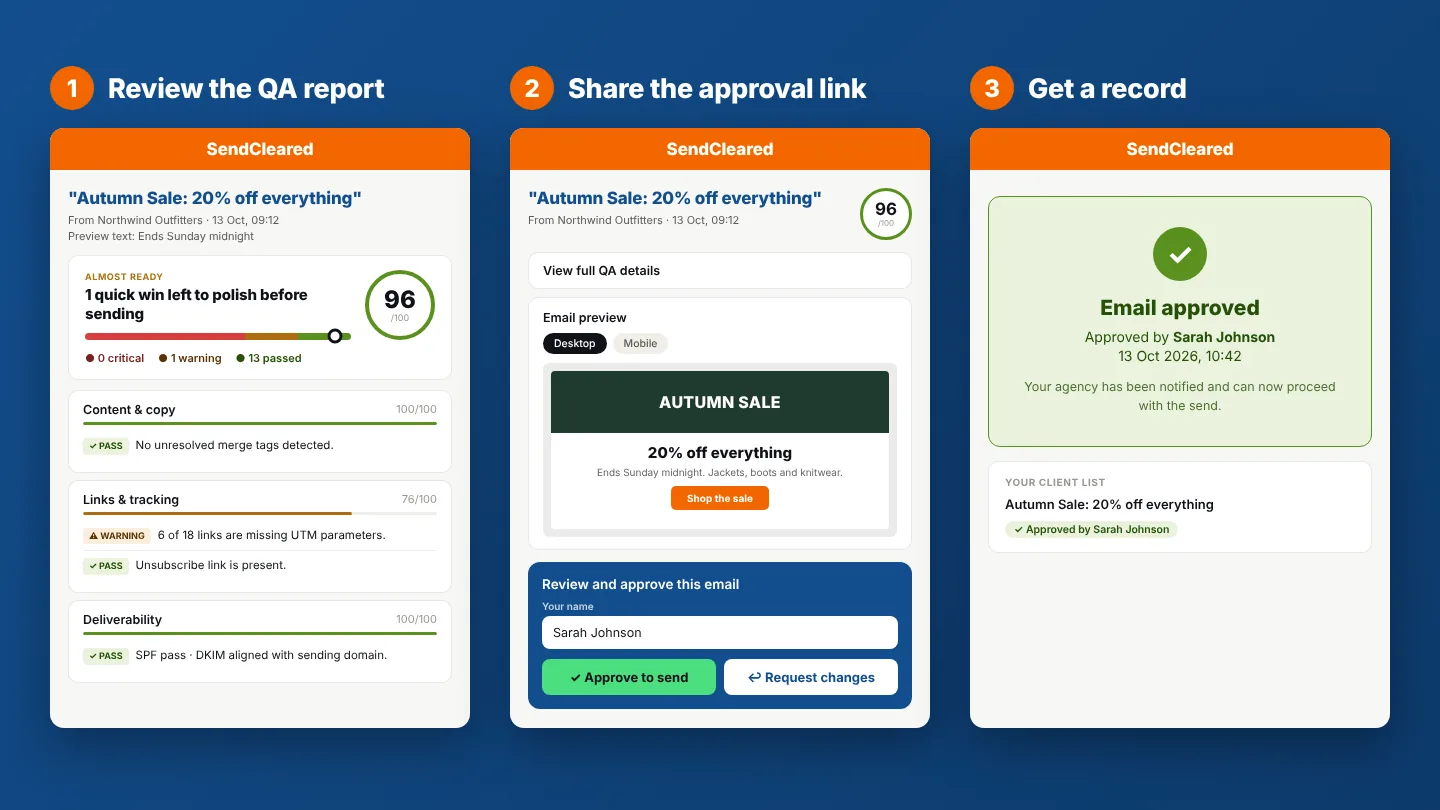
Where it’s strong: it covers the whole step between “I’ve finished building this and run a thorough QA” and “my client has approved it.” It works with any ESP that can send a test, and it’s priced for small teams, with a free tier and paid plans from $19/mo.
Where it falls short: it isn’t a rendering tool (although we’re exploring it). The approval page shows desktop and mobile widths, not how the email displays in Outlook, Gmail or Apple Mail. It’s also email-only. If you review video, PDFs or ads, you’ll want something broader alongside it.
2. Litmus: rendering previews plus enterprise collaboration
Best for: in-house teams with high email volume where rendering across many email clients is a recurring problem.
Litmus is best known for inbox rendering previews across 100+ client and device combinations, plus analytics and collaboration features. Litmus Proof, its review feature, is described in Litmus’s help documentation as available on Enterprise plans. It supports comments, resolving feedback, an approval button and version browsing, and reviewers outside your team can take part by email or a shared link.
Where it’s strong: rendering fidelity, and a broad platform for large teams.
Where it falls short for agencies and freelancers: pricing and fit. Review sits on the Enterprise tier, which has no public price and is sold through sales, so it’s a larger commitment than most small agencies want just for approvals. See our full Litmus comparison.
3. Email on Acid / Mailgun Inspect: rendering and code testing
Best for: email developers and teams building templates from code who need rendering previews, spam and accessibility testing.
Email on Acid offers previews across 100+ clients and devices, plus spam testing and code analysis, and has long been the more affordable alternative to Litmus. It is being succeeded by Mailgun Inspect, with existing subscribers moving over from June 2026, so plans and pricing are changing.
Where it’s strong: testing depth at a lower price than Litmus.
Where it falls short for agencies and freelancers: it’s built around the person running the tests, not around a client approving the result. See our full Email on Acid comparison.
4. Ziflow, Filestage and ProofHub: general proofing platforms
Best for: agencies and marketing teams reviewing many kinds of creative (video, PDFs, designs, web pages, ads) and managing multi-stage approvals.
These tools are built for review and approval in general. Clients and stakeholders can comment directly on a file and approve it, and they typically offer workflow stages, reviewer groups and integrations. ProofHub is closer to a project management tool with proofing built in, while Ziflow and Filestage are dedicated proofing platforms. Both Ziflow and Filestage offer limited free plans (Filestage’s covers one active project and a monthly cap on new files), with paid plans starting at around $199/mo. ProofHub is cheaper, from about $45/mo billed annually with a flat price rather than per user.
Where they’re strong: breadth. One tool for every asset type, with flexible multi-stage review.
Where they fall short for email marketers: they aren’t email-specific. They won’t automatically catch an unresolved merge tag or a missing unsubscribe link, and getting a real email into them usually means uploading a screenshot, HTML file or link rather than reviewing a live test send. For teams whose main work is email, that’s extra steps and no automated content checks. The dedicated platforms are also pitched at teams reviewing many projects, which can be more than a small email-focused agency needs.
5. ESP preview links and Slack threads: the default workaround
Best for: low-volume senders with relaxed clients and low stakes.
Many ESPs offer a shareable preview link or a test send, and plenty of agencies approve over email or Slack. It costs nothing and needs no setup.
Where it falls short: test emails often show placeholder data and look like tests, feedback scatters across threads, and there’s no reliable record of what was approved. It works until a client says “I never approved that.” For the full breakdown, see How to Send a Test Email Your Client Can Actually Review.
How to choose
Freelancer with a handful of clients
Start with the free route, or a free tier of an email-specific tool. You need a record and a clean client experience more than a big platform.
Small to mid-size agency, several clients
An email-specific approval tool covers QA and sign-off at a price that fits. Add a rendering tool only if you build custom templates that break in specific inboxes.
In-house team at volume
Rendering tools like Litmus or Email on Acid / Mailgun Inspect are the core purchase. Add a proofing platform if approvals involve many stakeholders.
Email is part of wider creative review
A general proofing platform makes sense, with an email-specific check run separately.
If you can only buy one
Pick based on the problem that actually costs you time. If it’s “does this break in Outlook,” buy rendering. If it’s “what did the client approve, and did I catch the broken link first,” buy email-specific QA and approval.
Common questions
What’s the difference between an approval tool and a proofing tool?
Proofing tools are built for commenting on and signing off creative assets of any kind. An email approval tool is specific to email: it checks the email itself (links, merge tags, unsubscribe) and then gets the client’s sign-off with a record.
Do I need a rendering tool as well?
Only if rendering differences across email clients are a recurring problem for you. Most agencies working from a few tested templates find content mistakes (broken links, unresolved merge tags, wrong offer details) cause far more trouble than rendering.
Does the client need an account?
With SendCleared, the client opens a link, reviews and approves. Check each other tool for its own client requirements.
Can I use more than one tool?
Yes, and many teams do. A rendering test on a template, once, plus per-campaign QA and approval, is a common pairing.
Is SendCleared free?
There’s a free tier with 3 approval links a month, no credit card required. Paid plans start at $19/mo.
SendCleared checks your email before your client sees it, then gives them a clean way to review and sign off.
Start free →3 approval links a month, no credit card required